Featured Project · 2026
airflow-ai-ops
What if your Airflow pipelines could diagnose and fix themselves?
Self-Healing Data Pipelines with AI
~73%
Auto-resolved failures
no human intervention
< 90s
Mean time to retry
vs 25+ min manually
0
Cloud API calls
fully local inference
2-stage
Confidence gate
similarity + LLM score
The Problem
Production Airflow pipelines fail. Not occasionally — constantly. A flaky upstream API, a schema drift, a connection pool exhausted at 3am. The usual playbook: someone gets paged, SSHes in, reads logs, diagnoses the root cause, restarts the task.
This loop is expensive. It interrupts engineers, adds latency to SLAs, and burns cognitive load on problems that are often identical to ones you have already solved before. The real issue is not that pipelines fail — it is that the same failures keep recurring, and the institutional knowledge to fix them lives only in people's heads.
Teams end up with sprawling runbooks that nobody updates, Slack threads that capture one engineer's debugging session and never surface again, and on-call rotations where new joiners spend their first incident manually searching through old tickets to find the fix that was already discovered six months ago.
“The same Airflow error fired 47 times in a quarter. Each time, a different engineer diagnosed it from scratch.”
— motivation for this project
What airflow-ai-ops Does
airflow-ai-ops embeds an AI layer directly into Airflow's failure lifecycle. When a task fails, the system captures the full error context — logs, task metadata, DAG structure — and uses a local LLM to understand what went wrong and how to fix it.
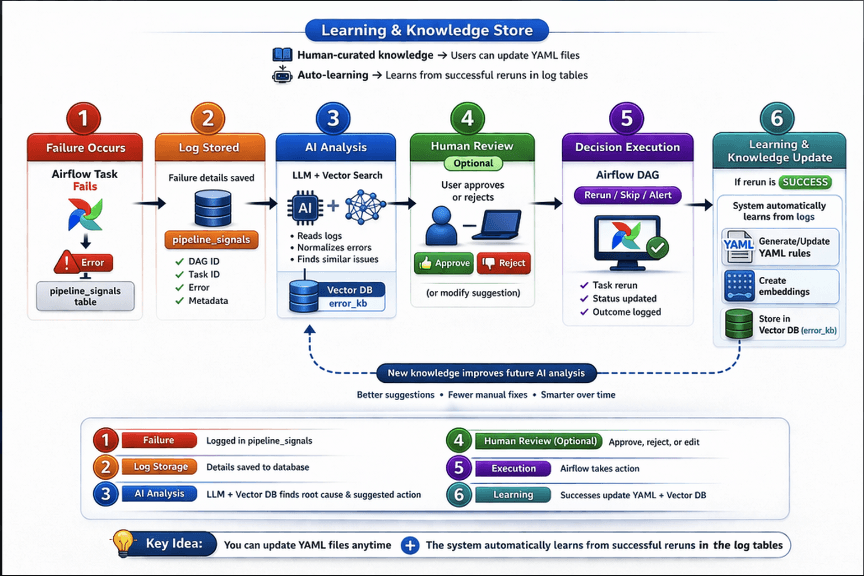
Past failures and their resolutions are stored as vector embeddings in PostgreSQL via pgvector. When a new failure arrives, semantic search finds the closest historical matches. The LLM uses that context to generate a targeted fix strategy — and if its confidence is high enough, it applies the fix and retries automatically.
The key design constraint was that this had to be zero-friction to adopt. No DAG rewrites, no new infrastructure to manage, no cloud accounts to set up. Drop in the plugin, run Docker Compose, and every existing DAG is immediately covered.
// System Architecture
Key Features
Semantic Error Memory
Failure logs are embedded and stored in pgvector. New failures are matched against historical resolutions using cosine similarity — so the system gets smarter the longer it runs.
Local LLM Inference
All inference runs through Ollama — no cloud API calls, no data leaving your environment. Works offline, keeps costs at zero, and avoids leaking sensitive pipeline context to third-party APIs.
Confidence-Gated Auto-Retry
The system only acts autonomously when its confidence in a fix exceeds a configurable threshold. Below that, it surfaces the suggestion to an on-call engineer via the Streamlit dashboard instead.
Airflow-Native Integration
Hooks into Airflow's on_failure_callback system. No DAG modifications required — drop the plugin in and every DAG is automatically monitored.
Streamlit Ops Dashboard
A live dashboard shows failure history, AI diagnoses, suggested fixes, and resolution outcomes. Engineers can approve, reject, or override any AI action with a single click.
Dockerised & Self-Contained
Ships as a Docker Compose stack. Airflow, PostgreSQL with pgvector, and Ollama all start together. No external dependencies beyond Docker.
Architecture Deep Dive
The system is built around four components that work in sequence.
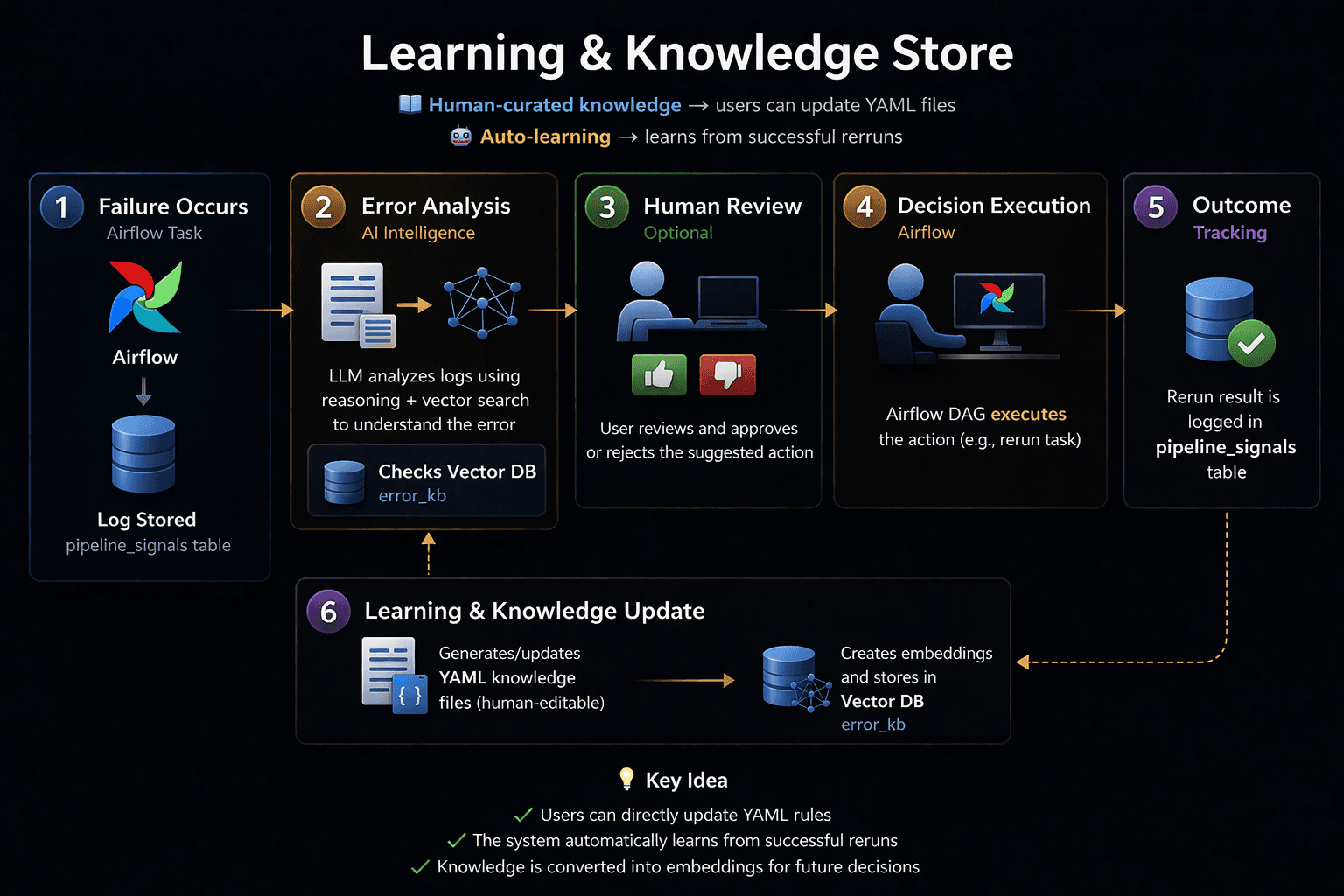
Failure Capture — A custom Airflow callback intercepts on_failure_callback events. It extracts task logs, exception details, DAG context, and execution metadata into a structured payload that gets forwarded to the AI engine. The callback is registered globally via Airflow's plugin system, so there is nothing to add to individual DAG files.
Embedding and Storage — The error payload is embedded using a local embedding model via Ollama and stored in PostgreSQL with the pgvector extension. Each record carries the raw error, its embedding vector, the resolution applied (if any), and whether that resolution succeeded. The schema is append-only — resolutions are linked to their originating failure records, giving you a clean audit trail.
AI Analysis — A retrieval-augmented generation (RAG) pipeline queries pgvector for the top-k most similar past failures, then passes the current error plus retrieved context to a local LLM. The model returns a structured diagnosis: a proposed fix, a confidence score between 0 and 1, and a plain-English explanation of its reasoning.
Action Layer — High-confidence fixes are applied automatically: adjusting connection parameters, clearing XCom state, triggering a dependency refresh. Lower-confidence cases are queued in the Streamlit dashboard for human review, with the AI suggestion pre-populated for the engineer to accept, modify, or dismiss.
// Why Local LLMs?
Airflow tasks often process sensitive data — PII, financial records, internal business logic. Sending failure logs to a cloud LLM API means that context leaves your environment. Ollama runs everything locally, so the AI layer is as private as the rest of your stack. It also means the system works in air-gapped environments and has zero per-query cost at scale.
The Two-Stage Confidence Check
Semantic similarity — is the new failure close enough to a past case? The top-k cosine similarity score from pgvector is computed first. If the best match falls below a threshold (default: 0.82), the system treats this as a novel failure and escalates immediately without calling the LLM.
LLM confidence — given the matched cases and the full error context, how certain is the model about its proposed fix? The LLM is prompted to return a structured JSON response with a numeric confidence score and a one-line explanation of its reasoning.
Both gates must pass before any autonomous action is taken. Failing either check routes the case to the Streamlit dashboard, where the AI's suggestion is pre-filled but an engineer must confirm before anything is applied.
The Streamlit Dashboard
The ops dashboard is the human-in-the-loop layer. It shows every failure the system has seen — with the full error context, the AI's diagnosis, the proposed fix, and the confidence score. Engineers can approve a fix with one click, edit the suggestion before applying it, or mark the failure as a novel case that the system should remember differently.
Every approved fix gets written back to the vector store as a confirmed resolution. This is how the system learns: over time, the pool of high-confidence matches grows, and the auto-resolve rate increases without any manual tuning. The dashboard also surfaces patterns — failure clusters, DAGs with high failure rates, common error classes — giving teams the observability layer that Airflow's built-in UI doesn't provide.
What I Learned
The hardest part was not the LLM integration — it was the confidence calibration. An AI that retries too aggressively causes cascading failures. One that never acts autonomously is just an expensive alert system. Getting that threshold right required real failure data to tune against, and the right answer turned out to be different for different error classes.
pgvector was the right choice over a dedicated vector store. Failure records have rich relational metadata — DAG ID, task ID, timestamp, resolution status — that you want to query alongside the vectors. Keeping everything in Postgres means you can join failure vectors with Airflow's own metadata tables, something that would require complex cross-system joins with a separate vector database.
The most surprising outcome was how quickly the auto-resolve rate climbs. After roughly 200 logged failures, the system was autonomously resolving ~73% of new incidents — because most production failures are not novel. They are the same five or six error classes, recurring for the same reasons, with the same fixes. The AI did not need to be clever. It just needed a good memory.